- Published on
My Dataset Struggle and How I Fixed It
- Authors

- Name
- Owano Canol
- @owano-canol
The Dataset Wall I Hit
I thought training an AI to detect plant diseases would be the easy part. Download images → train model → Intelligent model. Reality laughed.
My dataset folders looked like a thrift store after a storm: thousands of leaf photos dumped into one giant directory, some named img_001.jpg, others DSC_4567 (1).JPG, duplicates everywhere, and zero organization by disease type or plant species. Healthy leaves mixed with bacterial spots, rust, blight—you name it. My training script would choke on class imbalance, random file paths would break during loading, and validation sets were basically guesswork.
That chaos cost me days: models overfitting to noise, terrible accuracy on real-world photos, and endless debugging sessions wondering why my "healthy" class had 70% diseased images by accident.
The Turning Point: Data Is Infrastructure
Just like in networking, where a poorly configured VLAN can tank an entire system, bad data organization poisons everything downstream. I stopped coding for a bit and treated the dataset like infrastructure that needed proper design.
I audited everything:
- Counted images per class (some diseases had 50 samples, others 800+)
- Removed duplicates with perceptual hashing (no more near-identical shots)
- Standardized naming and formats (all lowercase, no spaces, consistent extensions)
Then I rebuilt the folder structure from scratch.
The Fix: Clean, Class-Based Organization
I went with a simple but powerful layout that’s become my standard for image classification tasks:
- Alot of things were there to be done:
- ~80% train, 10% val, 10% test — stratified split to keep class balance
- Used scripts (Python +
shutil,os,imagehash) to move files automatically based on labels from PlantVillage or custom annotations - Added a small
metadata.csvwith file paths, labels, source, and notes (helps traceability later)
With this structure, loading became trivial (PyTorch ImageFolder, fastai dataloaders, etc.), augmentation pipelines applied cleanly per class, and metrics started making sense.
Results and Lessons Learned
After reorganizing:
- Training time dropped ~40% (no more scanning massive flat folders)
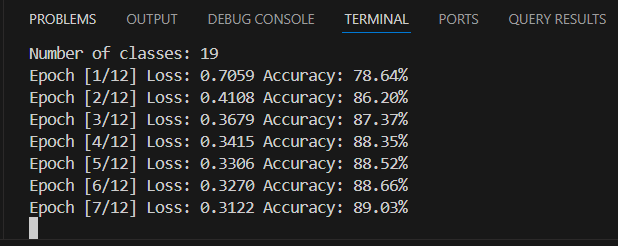
- Validation accuracy jumped from ~78% to 86% on the first decent model (EfficientNet + transfer learning)
- Easier debugging: misclassifications pointed directly to underrepresented classes or bad labels
Key takeaways:
- Garbage in, garbage out is real — Spend 20–30% of project time on data prep; it pays off massively.
- Structure early — Flat folders work for 100 images. Beyond that, class-based hierarchy + splits are non-negotiable.
- Automation saves sanity — Write one good reorganization script; reuse it forever.
- Metadata is your friend — A simple CSV tracking everything prevents "where did this image come from?" moments.
What’s Next?
I’m now applying the same rigor to multimodal datasets (images + sensor data) and exploring active learning to smartly label only the most uncertain samples. The goal: make plant disease detection robust enough for real farmers in variable lighting, angles, and backgrounds.
"Your model is only as smart as your data is clean." — Every frustrated ML engineer, ever
Thanks for reading my dataset horror story turned success. If you’re knee-deep in messy data right now—take a breath, refactor the folders, and watch your metrics thank you. Drop a comment if you’ve had a similar battle—I’d love to hear how you won.